
Color Picker with HEX & RGB Conversion
Overview
Chroma, developed by Lucuma Labs, is a lightweight web-based color utility designed to simplify color selection and conversion for digital creators. The software addresses the common workflow friction experienced by designers, developers, and content creators who frequently switch between RGB, HEX, and RGBa color formats. By providing a streamlined interface for selecting, viewing, and copying color values, Chroma reduces time spent on manual conversions and minimizes errors in code or design files.
Target users include frontend developers, UI/UX designers, and anyone working with digital color schemes who needs quick access to accurate color values. The tool is particularly useful when coding, designing interfaces, or preparing assets that require precise color specification. It operates entirely within the browser, requiring no installation, making it accessible from any device with internet access.
The application supports real-time color selection through a color wheel, direct input of HEX or RGB values, and instant copying of formatted color codes. Users can save frequently used colors and benefit from a dynamic Shades Palette that adapts to screen size, enabling vertical display alongside code editors. The last-used color is preserved between sessions, enhancing continuity in ongoing projects.
Key Features & Capabilities
- Color Wheel Selection – Choose any color visually using an intuitive color wheel interface, ideal for exploratory design work.
- Direct HEX/RGB Input – Enter color codes manually for precise control, especially useful when working with existing design systems or code.
- One-Click Copy to Clipboard – Right-click to copy HEX, RGB, or RGBa values instantly, minimizing workflow interruptions.
- Color Saving Functionality – Store frequently used colors for quick access in future sessions, reducing repetitive input.
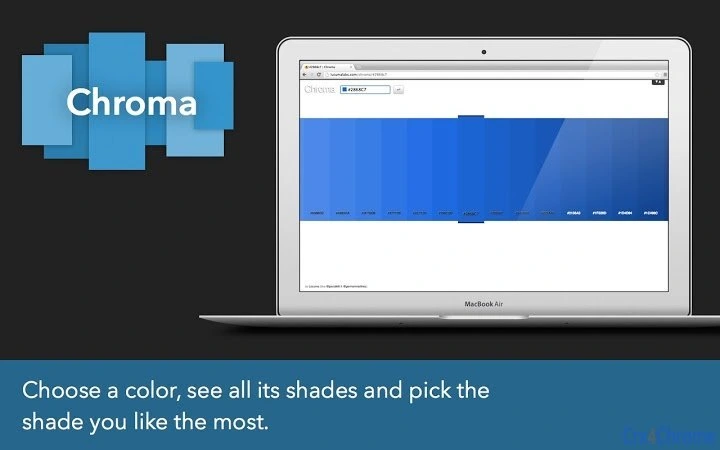
- Adaptive Shades Palette – Resize the browser window to display a vertical palette of color variations, ideal for side-by-side comparison with code editors.
- Auto-Presence of Last Color – The most recently used color is automatically displayed upon reopening, improving continuity.
- Horizontal Scrolling – Navigate through the palette using the mouse wheel for efficient browsing of color variations.
- Multiple Format Support – Seamlessly switch between HEX, RGB, and RGBa modes based on project needs.
These features are particularly effective in real-world scenarios such as frontend development, where accurate color formatting is critical. Designers can use the tool to verify color values before exporting assets, while developers can quickly extract and insert color codes into CSS or JavaScript files without context switching.
User Interface, Workflow & Performance
Chroma features a clean, minimal interface optimized for speed and clarity. The layout centers around the color wheel, with input fields and the Shades Palette positioned for easy access. Navigation is intuitive, relying on standard mouse interactions—clicking, right-clicking, and scrolling—without requiring additional tutorials or setup.
Workflow efficiency is enhanced by the ability to copy color values with a single right-click, eliminating the need for manual selection or copy-paste steps. The adaptive layout ensures usability across different screen sizes, particularly beneficial when using dual monitors or working in split-screen mode with code editors.
As a web application, Chroma runs entirely in the browser with no local installation. Performance is consistent with typical web app behavior, relying on client-side processing. The developer did not specify resource usage details, but the 1.2 MB file size suggests low overhead. Stability is expected to be high, given the lightweight nature and lack of background processes. No reported crashes or freezes were noted in the provided information.
Compatibility & System Requirements
Chroma is a web application accessible through modern browsers on any device with internet connectivity. It does not require specific operating systems or hardware configurations, making it compatible with Windows, Mac, Linux, and mobile platforms that support web browsers.
The software version is 2.0, released on November 15, 2023. The installation size is 1.2 MB, which reflects the client-side assets loaded in the browser. Exact system requirements were not listed, but compatibility is expected to extend to any system capable of running a current browser version.
Since it operates as a web app, no local installation or administrative privileges are needed. Users can access Chroma from any location, provided they have a stable internet connection and a supported browser.
Pros and Cons
Pros
- Lightweight and fast-loading web application
- Intuitive interface with minimal learning curve
- Supports multiple color formats: HEX, RGB, RGBa
- One-click copying of color values via right-click
- Adaptive layout for vertical display alongside code editors
- Preserves last-used color for continuity
- Free to use with no hidden costs
- Accessible from any device with a browser
Cons
- Requires an active internet connection to function
- No offline mode available
- Limited to browser-based use, no desktop app version
- Color saving functionality may not persist across devices
- Dependent on browser performance and stability
FAQ Section
Is Chroma available as a desktop application?
Chroma is currently a web application and does not have a standalone desktop version. It runs directly in your browser.
Can I use Chroma without an internet connection?
No, Chroma requires an active internet connection since it is a web-based tool. Offline usage is not supported.
Is Chroma safe to use?
Yes, Chroma operates entirely in the browser and does not collect or transmit user data. It is a secure tool for color selection and conversion.
Does Chroma support dark mode?
The provided information does not specify whether Chroma includes a dark mode. The interface may adapt to system preferences but was not confirmed.
How often is Chroma updated?
Chroma version 2.0 was released on November 15, 2023. The developer has not specified a regular update schedule, but improvements are expected based on user feedback.
Final Thoughts
Chroma delivers a focused, efficient solution for professionals who need rapid access to accurate color values in multiple formats. Its clean design, intuitive workflow, and support for HEX, RGB, and RGBa make it a valuable addition to any digital creator’s toolkit. The ability to preserve the last-used color and adapt the interface for side-by-side work with code editors enhances productivity significantly.
While it lacks offline functionality and a desktop app, its web-based nature ensures broad accessibility and zero installation overhead. For developers and designers who prioritize speed, accuracy, and simplicity, Chroma stands out as a reliable and free utility.
Download Chroma now







